In a Nutshell An SREF code stands for Style REFerence. It's a number that Midjourney reads as a specific visual style — a palette, a medium, an artistic technique. Adding --sref {your SREF code} after your prompt applies it to your text (or image).
surreal monochrome fashion portrait of pale woman with platinum hair, sheer face veil, dark lips, enormous asymmetric translucent rabbit ears studded with metallic spheres. Oversized black off-shoulder jacket, exposed back, sideways pose, direct gaze. Gothic avant-garde couture, grainy analog photography, soft sculptural lighting, muted gray backdrop, haunting theatrical elegance --v 8.2 Prompt copied! The prompt alone: no --sref
surreal monochrome fashion portrait of pale woman with platinum hair, sheer face veil, dark lips, enormous asymmetric translucent rabbit ears studded with metallic spheres. Oversized black off-shoulder jacket, exposed back, sideways pose, direct gaze. Gothic avant-garde couture, grainy analog photography, soft sculptural lighting, muted gray backdrop, haunting theatrical elegance --sref 7709 --v 8.2 Prompt copied! surreal monochrome fashion portrait of pale woman with platinum hair, sheer face veil, dark lips, enormous asymmetric translucent rabbit ears studded with metallic spheres. Oversized black off-shoulder jacket, exposed back, sideways pose, direct gaze. Gothic avant-garde couture, grainy analog photography, soft sculptural lighting, muted gray backdrop, haunting theatrical elegance --sref 1594139439 --v 8.2 Prompt copied! surreal monochrome fashion portrait of pale woman with platinum hair, sheer face veil, dark lips, enormous asymmetric translucent rabbit ears studded with metallic spheres. Oversized black off-shoulder jacket, exposed back, sideways pose, direct gaze. Gothic avant-garde couture, grainy analog photography, soft sculptural lighting, muted gray backdrop, haunting theatrical elegance --sref 4024816613 --v 8.2 Prompt copied! And since there are infinite thousands of SREF styles, each with their own specifics, visual features, boldness or finesse, color palette, design capabilities — your options are endless. Let's see how it works!
The Setup This experiment is quite straightforward: I took one prompt and ran it in Midjourney 30 times, changing one thing: the SREF code. Same words, same aspect ratio, same model version.
The experiment Each trial brought back 4 renders, and I picked one image from each set. There’s also a version with the prompt alone, without an --sref code, as a baseline for comparison.
The prompt asked for a lot: from specific structural details — a gas mask with circular filters, a heavy brow, a crown-like head, bared teeth, skulls and crosses, to visual features — four named colors on deep black, texture and technique specifics, even the piece's energy. With this, I tried to establish a challenging prompt, since the more pieces there are in the puzzle, the easier it is to see which parts an SREF impacts the most, and what it discards.
The experiment’s prompt Click to copy
Frontal close-up portrait of menacing gorilla-like figure wearing industrial gas mask with circular side filters, heavy brow, angular crown-like head, exposed teeth, skull and cross symbols. Raw neo-expressionist graffiti collage, fluorescent lime green, hot pink, electric blue, blazing orange against deep black. Thick acrylic brushstrokes, rough paint smears, drips, scratches, stenciled symbols, handwritten lettering, overlapping geometric shapes. Distressed photographic textures, chaotic layering, aggressive punk energy, high contrast, deliberately crude execution --v 8.2 Prompt copied! A quick hint: The prompt is inspired by a graffiti I once saw. From my memory, I described the graffiti as best I could to ChatGPT, then asked it to brainstorm a richer, text-to-image AI prompt oriented formula for each of the features from that description. The result — sharp, focused, Midjourney-ready prompt perfect for this experiment.
The prompt alone: no --sref
Note how it lands almost the whole list: the crown, the mask, the skull on the filter, pink teeth, all four colors on black, even the torn photo scraps of a collage. So every change you see below comes from the code.
Now the same prompt, with a code. Here are the first six.
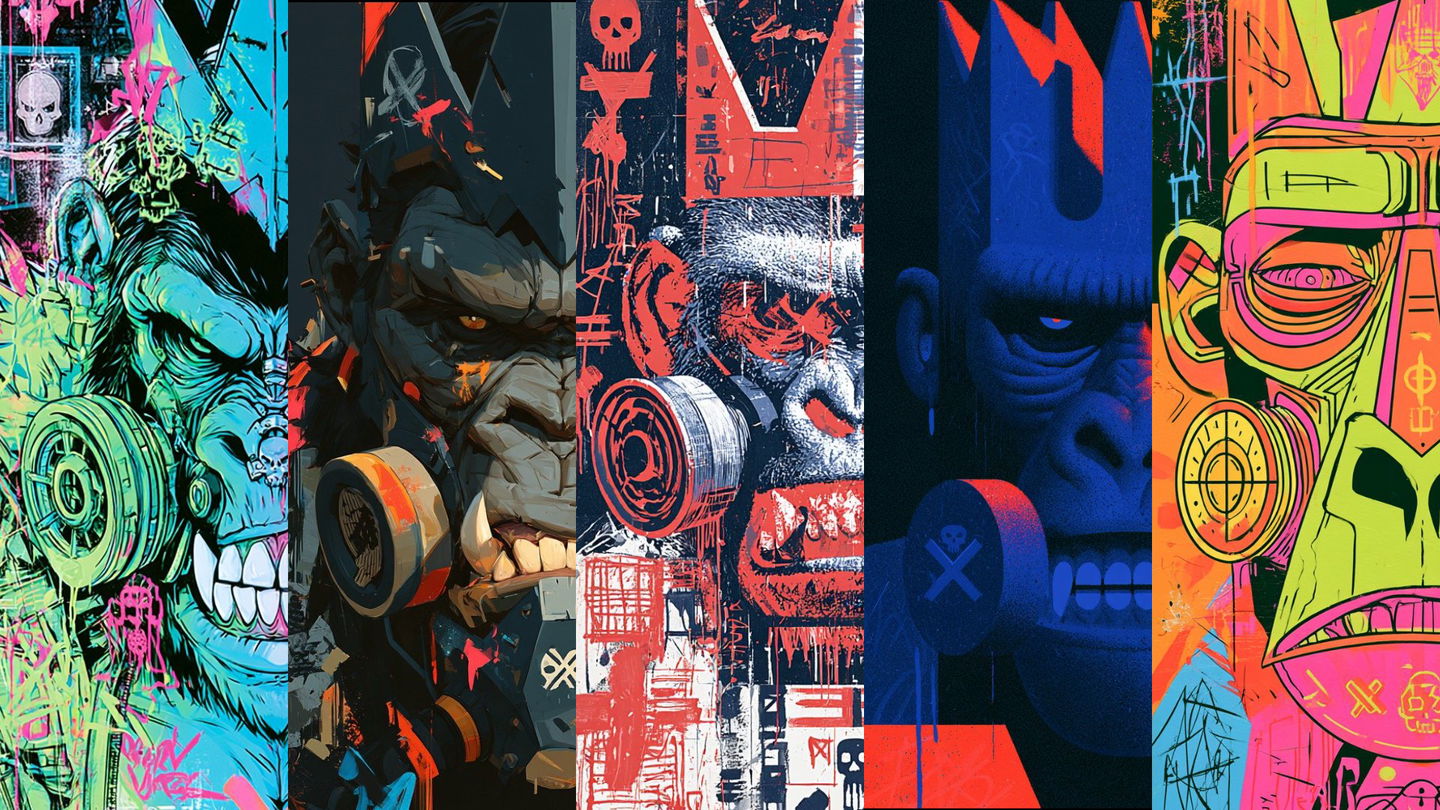
--sref 1142682798 --v 8.2 Prompt copied! --sref 856403743 --v 8.2 Prompt copied! --sref 3655041807 --v 8.2 Prompt copied! --sref 843532024 --v 8.2 Prompt copied! --sref 1259650306 --v 8.2 Prompt copied! --sref 3761600432 --v 8.2 Prompt copied! What an SREF Code Is Look at the six gorillas below. Same words, same ratio, same model.
What allowed for such an insane stylistic variety are the SREF codes, one at a time.
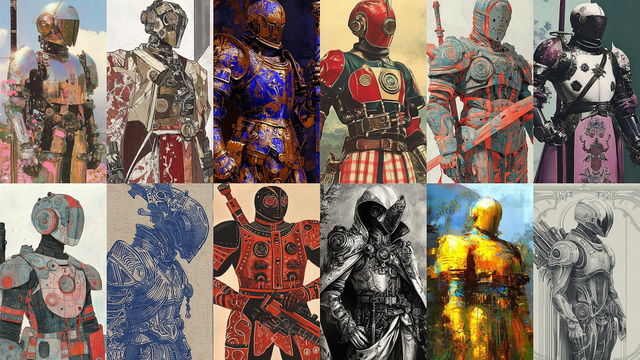
--sref 2187715071 --v 8.2 Prompt copied! --sref 883095331 --v 8.2 Prompt copied! --sref 3628600513 --v 8.2 Prompt copied! --sref 3992755084 --v 8.2 Prompt copied! --sref 1928012108 --v 8.2 Prompt copied! --sref 3562064721 --v 8.2 Prompt copied! A piece of trivia. Since 1543275391 is hard to remember but Cutout Kinetica isn't, we tried our best to give each of the SREF codes in the library their own distinct names!
What the SREF Code Takes, What the Prompt Keeps So, between different SREFs, what moved, and what refused to? Around all 120 renders (30 picks✕4 variants per code), checked against the prompt's own list.
The figure barely moved: the gas mask showed up in 119 of 120 renders, the skulls and crosses persisted in 116, the crown in 115, the bared teeth in 114. What moved a lot was the look: the deep black ground held in less than half samples, and all four named colors survived together in only 42(!).
--sref 953713012 --v 8.2 Prompt copied! --sref 447364311 --v 8.2 Prompt copied! --sref 3426360177 --v 8.2 Prompt copied! --sref 1886358370 --v 8.2 Prompt copied! --sref 410714262 --v 8.2 Prompt copied! --sref 2908228807 --v 8.2 Prompt copied! It's a hard-to-miss pattern. The prompt keeps the story: who is in the picture, what they wear, what they do. The SREF code owns the look: visual style, technique, palette.
The colors don't vanish; they get diluted and thin out. Orange held on in 103 of 120 renders, lime in only 69. The black ground is part code, part luck: 24 styles painted one at least once, but only 8 kept it in all four variants.
Note: My picks didn't tilt the count. The 30 samples I chose for looks match the entire set.
--sref 1543275391 --v 8.2 Prompt copied! --sref 1572418122 --v 8.2 Prompt copied! --sref 392378041 --v 8.2 Prompt copied! --sref 3558925719 --v 8.2 Prompt copied! --sref 2801123834 --v 8.2 Prompt copied! --sref 1156401594 --v 8.2 Prompt copied! And it's a perfect spot to make an important point: a code can lend you a look, but what's in the picture remains yours to say.
How Hard an SREF Code Pulls There is a dial in Midjourney allowing you to dial down the force with which an SREF code affects your prompt: --sw , or the style weight . It runs from 0 to 1000, with 100 being the default. Lower it — and the prompt gets more say. Leave it untouched, and the code completely takes over. All 30 pictures in this test used the default. And the higher you go, the more the SREF will impose its style features and preferred subjects onto your prompt, gradually losing many of the original prompt details.
To see how leveraging --sw affects the outcome, I picked Ferricircuit , and ran the same prompt with a fixed seed 31 times, changing only the style weight. Drag the slider to see how it turned out!
portrait of geisha in style of Japanese experimental graphic design, Y2K techno aesthetics, retrofuturist digital brutalism, radical asymmetry, modular grids, oversized pixel typography, condensed geometric sans-serif, vertical typographic arrangements, dense microtype, sharp color blocking. Fluorescent lime, electric cobalt, ultraviolet purple, vivid orange, coral red, stark black and white. Glossy translucent textures, iridescent gradients, crisp geometric edges, high-contrast lighting, subtle pixelation, digital noise, halftone grain. Playful maximalism, precise visual hierarchy, aggressive cropping, high-impact editorial composition --sref 832317492 --sw 0 --v 8.2 Prompt copied! portrait of geisha in style of Japanese experimental graphic design, Y2K techno aesthetics, retrofuturist digital brutalism, radical asymmetry, modular grids, oversized pixel typography, condensed geometric sans-serif, vertical typographic arrangements, dense microtype, sharp color blocking. Fluorescent lime, electric cobalt, ultraviolet purple, vivid orange, coral red, stark black and white. Glossy translucent textures, iridescent gradients, crisp geometric edges, high-contrast lighting, subtle pixelation, digital noise, halftone grain. Playful maximalism, precise visual hierarchy, aggressive cropping, high-impact editorial composition --sref 832317492 --sw 10 --v 8.2 Prompt copied! portrait of geisha in style of Japanese experimental graphic design, Y2K techno aesthetics, retrofuturist digital brutalism, radical asymmetry, modular grids, oversized pixel typography, condensed geometric sans-serif, vertical typographic arrangements, dense microtype, sharp color blocking. Fluorescent lime, electric cobalt, ultraviolet purple, vivid orange, coral red, stark black and white. Glossy translucent textures, iridescent gradients, crisp geometric edges, high-contrast lighting, subtle pixelation, digital noise, halftone grain. Playful maximalism, precise visual hierarchy, aggressive cropping, high-impact editorial composition --sref 832317492 --sw 20 --v 8.2 Prompt copied! portrait of geisha in style of Japanese experimental graphic design, Y2K techno aesthetics, retrofuturist digital brutalism, radical asymmetry, modular grids, oversized pixel typography, condensed geometric sans-serif, vertical typographic arrangements, dense microtype, sharp color blocking. Fluorescent lime, electric cobalt, ultraviolet purple, vivid orange, coral red, stark black and white. Glossy translucent textures, iridescent gradients, crisp geometric edges, high-contrast lighting, subtle pixelation, digital noise, halftone grain. Playful maximalism, precise visual hierarchy, aggressive cropping, high-impact editorial composition --sref 832317492 --sw 30 --v 8.2 Prompt copied! portrait of geisha in style of Japanese experimental graphic design, Y2K techno aesthetics, retrofuturist digital brutalism, radical asymmetry, modular grids, oversized pixel typography, condensed geometric sans-serif, vertical typographic arrangements, dense microtype, sharp color blocking. Fluorescent lime, electric cobalt, ultraviolet purple, vivid orange, coral red, stark black and white. Glossy translucent textures, iridescent gradients, crisp geometric edges, high-contrast lighting, subtle pixelation, digital noise, halftone grain. Playful maximalism, precise visual hierarchy, aggressive cropping, high-impact editorial composition --sref 832317492 --sw 40 --v 8.2 Prompt copied! portrait of geisha in style of Japanese experimental graphic design, Y2K techno aesthetics, retrofuturist digital brutalism, radical asymmetry, modular grids, oversized pixel typography, condensed geometric sans-serif, vertical typographic arrangements, dense microtype, sharp color blocking. Fluorescent lime, electric cobalt, ultraviolet purple, vivid orange, coral red, stark black and white. Glossy translucent textures, iridescent gradients, crisp geometric edges, high-contrast lighting, subtle pixelation, digital noise, halftone grain. Playful maximalism, precise visual hierarchy, aggressive cropping, high-impact editorial composition --sref 832317492 --sw 50 --v 8.2 Prompt copied! portrait of geisha in style of Japanese experimental graphic design, Y2K techno aesthetics, retrofuturist digital brutalism, radical asymmetry, modular grids, oversized pixel typography, condensed geometric sans-serif, vertical typographic arrangements, dense microtype, sharp color blocking. Fluorescent lime, electric cobalt, ultraviolet purple, vivid orange, coral red, stark black and white. Glossy translucent textures, iridescent gradients, crisp geometric edges, high-contrast lighting, subtle pixelation, digital noise, halftone grain. Playful maximalism, precise visual hierarchy, aggressive cropping, high-impact editorial composition --sref 832317492 --sw 60 --v 8.2 Prompt copied! portrait of geisha in style of Japanese experimental graphic design, Y2K techno aesthetics, retrofuturist digital brutalism, radical asymmetry, modular grids, oversized pixel typography, condensed geometric sans-serif, vertical typographic arrangements, dense microtype, sharp color blocking. Fluorescent lime, electric cobalt, ultraviolet purple, vivid orange, coral red, stark black and white. Glossy translucent textures, iridescent gradients, crisp geometric edges, high-contrast lighting, subtle pixelation, digital noise, halftone grain. Playful maximalism, precise visual hierarchy, aggressive cropping, high-impact editorial composition --sref 832317492 --sw 70 --v 8.2 Prompt copied! portrait of geisha in style of Japanese experimental graphic design, Y2K techno aesthetics, retrofuturist digital brutalism, radical asymmetry, modular grids, oversized pixel typography, condensed geometric sans-serif, vertical typographic arrangements, dense microtype, sharp color blocking. Fluorescent lime, electric cobalt, ultraviolet purple, vivid orange, coral red, stark black and white. Glossy translucent textures, iridescent gradients, crisp geometric edges, high-contrast lighting, subtle pixelation, digital noise, halftone grain. Playful maximalism, precise visual hierarchy, aggressive cropping, high-impact editorial composition --sref 832317492 --sw 80 --v 8.2 Prompt copied! portrait of geisha in style of Japanese experimental graphic design, Y2K techno aesthetics, retrofuturist digital brutalism, radical asymmetry, modular grids, oversized pixel typography, condensed geometric sans-serif, vertical typographic arrangements, dense microtype, sharp color blocking. Fluorescent lime, electric cobalt, ultraviolet purple, vivid orange, coral red, stark black and white. Glossy translucent textures, iridescent gradients, crisp geometric edges, high-contrast lighting, subtle pixelation, digital noise, halftone grain. Playful maximalism, precise visual hierarchy, aggressive cropping, high-impact editorial composition --sref 832317492 --sw 90 --v 8.2 Prompt copied! portrait of geisha in style of Japanese experimental graphic design, Y2K techno aesthetics, retrofuturist digital brutalism, radical asymmetry, modular grids, oversized pixel typography, condensed geometric sans-serif, vertical typographic arrangements, dense microtype, sharp color blocking. Fluorescent lime, electric cobalt, ultraviolet purple, vivid orange, coral red, stark black and white. Glossy translucent textures, iridescent gradients, crisp geometric edges, high-contrast lighting, subtle pixelation, digital noise, halftone grain. Playful maximalism, precise visual hierarchy, aggressive cropping, high-impact editorial composition --sref 832317492 --sw 100 --v 8.2 Prompt copied! portrait of geisha in style of Japanese experimental graphic design, Y2K techno aesthetics, retrofuturist digital brutalism, radical asymmetry, modular grids, oversized pixel typography, condensed geometric sans-serif, vertical typographic arrangements, dense microtype, sharp color blocking. Fluorescent lime, electric cobalt, ultraviolet purple, vivid orange, coral red, stark black and white. Glossy translucent textures, iridescent gradients, crisp geometric edges, high-contrast lighting, subtle pixelation, digital noise, halftone grain. Playful maximalism, precise visual hierarchy, aggressive cropping, high-impact editorial composition --sref 832317492 --sw 125 --v 8.2 Prompt copied! portrait of geisha in style of Japanese experimental graphic design, Y2K techno aesthetics, retrofuturist digital brutalism, radical asymmetry, modular grids, oversized pixel typography, condensed geometric sans-serif, vertical typographic arrangements, dense microtype, sharp color blocking. Fluorescent lime, electric cobalt, ultraviolet purple, vivid orange, coral red, stark black and white. Glossy translucent textures, iridescent gradients, crisp geometric edges, high-contrast lighting, subtle pixelation, digital noise, halftone grain. Playful maximalism, precise visual hierarchy, aggressive cropping, high-impact editorial composition --sref 832317492 --sw 150 --v 8.2 Prompt copied! portrait of geisha in style of Japanese experimental graphic design, Y2K techno aesthetics, retrofuturist digital brutalism, radical asymmetry, modular grids, oversized pixel typography, condensed geometric sans-serif, vertical typographic arrangements, dense microtype, sharp color blocking. Fluorescent lime, electric cobalt, ultraviolet purple, vivid orange, coral red, stark black and white. Glossy translucent textures, iridescent gradients, crisp geometric edges, high-contrast lighting, subtle pixelation, digital noise, halftone grain. Playful maximalism, precise visual hierarchy, aggressive cropping, high-impact editorial composition --sref 832317492 --sw 175 --v 8.2 Prompt copied! portrait of geisha in style of Japanese experimental graphic design, Y2K techno aesthetics, retrofuturist digital brutalism, radical asymmetry, modular grids, oversized pixel typography, condensed geometric sans-serif, vertical typographic arrangements, dense microtype, sharp color blocking. Fluorescent lime, electric cobalt, ultraviolet purple, vivid orange, coral red, stark black and white. Glossy translucent textures, iridescent gradients, crisp geometric edges, high-contrast lighting, subtle pixelation, digital noise, halftone grain. Playful maximalism, precise visual hierarchy, aggressive cropping, high-impact editorial composition --sref 832317492 --sw 200 --v 8.2 Prompt copied! portrait of geisha in style of Japanese experimental graphic design, Y2K techno aesthetics, retrofuturist digital brutalism, radical asymmetry, modular grids, oversized pixel typography, condensed geometric sans-serif, vertical typographic arrangements, dense microtype, sharp color blocking. Fluorescent lime, electric cobalt, ultraviolet purple, vivid orange, coral red, stark black and white. Glossy translucent textures, iridescent gradients, crisp geometric edges, high-contrast lighting, subtle pixelation, digital noise, halftone grain. Playful maximalism, precise visual hierarchy, aggressive cropping, high-impact editorial composition --sref 832317492 --sw 250 --v 8.2 Prompt copied! portrait of geisha in style of Japanese experimental graphic design, Y2K techno aesthetics, retrofuturist digital brutalism, radical asymmetry, modular grids, oversized pixel typography, condensed geometric sans-serif, vertical typographic arrangements, dense microtype, sharp color blocking. Fluorescent lime, electric cobalt, ultraviolet purple, vivid orange, coral red, stark black and white. Glossy translucent textures, iridescent gradients, crisp geometric edges, high-contrast lighting, subtle pixelation, digital noise, halftone grain. Playful maximalism, precise visual hierarchy, aggressive cropping, high-impact editorial composition --sref 832317492 --sw 300 --v 8.2 Prompt copied! portrait of geisha in style of Japanese experimental graphic design, Y2K techno aesthetics, retrofuturist digital brutalism, radical asymmetry, modular grids, oversized pixel typography, condensed geometric sans-serif, vertical typographic arrangements, dense microtype, sharp color blocking. Fluorescent lime, electric cobalt, ultraviolet purple, vivid orange, coral red, stark black and white. Glossy translucent textures, iridescent gradients, crisp geometric edges, high-contrast lighting, subtle pixelation, digital noise, halftone grain. Playful maximalism, precise visual hierarchy, aggressive cropping, high-impact editorial composition --sref 832317492 --sw 350 --v 8.2 Prompt copied! portrait of geisha in style of Japanese experimental graphic design, Y2K techno aesthetics, retrofuturist digital brutalism, radical asymmetry, modular grids, oversized pixel typography, condensed geometric sans-serif, vertical typographic arrangements, dense microtype, sharp color blocking. Fluorescent lime, electric cobalt, ultraviolet purple, vivid orange, coral red, stark black and white. Glossy translucent textures, iridescent gradients, crisp geometric edges, high-contrast lighting, subtle pixelation, digital noise, halftone grain. Playful maximalism, precise visual hierarchy, aggressive cropping, high-impact editorial composition --sref 832317492 --sw 400 --v 8.2 Prompt copied! portrait of geisha in style of Japanese experimental graphic design, Y2K techno aesthetics, retrofuturist digital brutalism, radical asymmetry, modular grids, oversized pixel typography, condensed geometric sans-serif, vertical typographic arrangements, dense microtype, sharp color blocking. Fluorescent lime, electric cobalt, ultraviolet purple, vivid orange, coral red, stark black and white. Glossy translucent textures, iridescent gradients, crisp geometric edges, high-contrast lighting, subtle pixelation, digital noise, halftone grain. Playful maximalism, precise visual hierarchy, aggressive cropping, high-impact editorial composition --sref 832317492 --sw 450 --v 8.2 Prompt copied! portrait of geisha in style of Japanese experimental graphic design, Y2K techno aesthetics, retrofuturist digital brutalism, radical asymmetry, modular grids, oversized pixel typography, condensed geometric sans-serif, vertical typographic arrangements, dense microtype, sharp color blocking. Fluorescent lime, electric cobalt, ultraviolet purple, vivid orange, coral red, stark black and white. Glossy translucent textures, iridescent gradients, crisp geometric edges, high-contrast lighting, subtle pixelation, digital noise, halftone grain. Playful maximalism, precise visual hierarchy, aggressive cropping, high-impact editorial composition --sref 832317492 --sw 500 --v 8.2 Prompt copied! portrait of geisha in style of Japanese experimental graphic design, Y2K techno aesthetics, retrofuturist digital brutalism, radical asymmetry, modular grids, oversized pixel typography, condensed geometric sans-serif, vertical typographic arrangements, dense microtype, sharp color blocking. Fluorescent lime, electric cobalt, ultraviolet purple, vivid orange, coral red, stark black and white. Glossy translucent textures, iridescent gradients, crisp geometric edges, high-contrast lighting, subtle pixelation, digital noise, halftone grain. Playful maximalism, precise visual hierarchy, aggressive cropping, high-impact editorial composition --sref 832317492 --sw 550 --v 8.2 Prompt copied! portrait of geisha in style of Japanese experimental graphic design, Y2K techno aesthetics, retrofuturist digital brutalism, radical asymmetry, modular grids, oversized pixel typography, condensed geometric sans-serif, vertical typographic arrangements, dense microtype, sharp color blocking. Fluorescent lime, electric cobalt, ultraviolet purple, vivid orange, coral red, stark black and white. Glossy translucent textures, iridescent gradients, crisp geometric edges, high-contrast lighting, subtle pixelation, digital noise, halftone grain. Playful maximalism, precise visual hierarchy, aggressive cropping, high-impact editorial composition --sref 832317492 --sw 600 --v 8.2 Prompt copied! portrait of geisha in style of Japanese experimental graphic design, Y2K techno aesthetics, retrofuturist digital brutalism, radical asymmetry, modular grids, oversized pixel typography, condensed geometric sans-serif, vertical typographic arrangements, dense microtype, sharp color blocking. Fluorescent lime, electric cobalt, ultraviolet purple, vivid orange, coral red, stark black and white. Glossy translucent textures, iridescent gradients, crisp geometric edges, high-contrast lighting, subtle pixelation, digital noise, halftone grain. Playful maximalism, precise visual hierarchy, aggressive cropping, high-impact editorial composition --sref 832317492 --sw 650 --v 8.2 Prompt copied! portrait of geisha in style of Japanese experimental graphic design, Y2K techno aesthetics, retrofuturist digital brutalism, radical asymmetry, modular grids, oversized pixel typography, condensed geometric sans-serif, vertical typographic arrangements, dense microtype, sharp color blocking. Fluorescent lime, electric cobalt, ultraviolet purple, vivid orange, coral red, stark black and white. Glossy translucent textures, iridescent gradients, crisp geometric edges, high-contrast lighting, subtle pixelation, digital noise, halftone grain. Playful maximalism, precise visual hierarchy, aggressive cropping, high-impact editorial composition --sref 832317492 --sw 700 --v 8.2 Prompt copied! portrait of geisha in style of Japanese experimental graphic design, Y2K techno aesthetics, retrofuturist digital brutalism, radical asymmetry, modular grids, oversized pixel typography, condensed geometric sans-serif, vertical typographic arrangements, dense microtype, sharp color blocking. Fluorescent lime, electric cobalt, ultraviolet purple, vivid orange, coral red, stark black and white. Glossy translucent textures, iridescent gradients, crisp geometric edges, high-contrast lighting, subtle pixelation, digital noise, halftone grain. Playful maximalism, precise visual hierarchy, aggressive cropping, high-impact editorial composition --sref 832317492 --sw 750 --v 8.2 Prompt copied! portrait of geisha in style of Japanese experimental graphic design, Y2K techno aesthetics, retrofuturist digital brutalism, radical asymmetry, modular grids, oversized pixel typography, condensed geometric sans-serif, vertical typographic arrangements, dense microtype, sharp color blocking. Fluorescent lime, electric cobalt, ultraviolet purple, vivid orange, coral red, stark black and white. Glossy translucent textures, iridescent gradients, crisp geometric edges, high-contrast lighting, subtle pixelation, digital noise, halftone grain. Playful maximalism, precise visual hierarchy, aggressive cropping, high-impact editorial composition --sref 832317492 --sw 800 --v 8.2 Prompt copied! portrait of geisha in style of Japanese experimental graphic design, Y2K techno aesthetics, retrofuturist digital brutalism, radical asymmetry, modular grids, oversized pixel typography, condensed geometric sans-serif, vertical typographic arrangements, dense microtype, sharp color blocking. Fluorescent lime, electric cobalt, ultraviolet purple, vivid orange, coral red, stark black and white. Glossy translucent textures, iridescent gradients, crisp geometric edges, high-contrast lighting, subtle pixelation, digital noise, halftone grain. Playful maximalism, precise visual hierarchy, aggressive cropping, high-impact editorial composition --sref 832317492 --sw 850 --v 8.2 Prompt copied! portrait of geisha in style of Japanese experimental graphic design, Y2K techno aesthetics, retrofuturist digital brutalism, radical asymmetry, modular grids, oversized pixel typography, condensed geometric sans-serif, vertical typographic arrangements, dense microtype, sharp color blocking. Fluorescent lime, electric cobalt, ultraviolet purple, vivid orange, coral red, stark black and white. Glossy translucent textures, iridescent gradients, crisp geometric edges, high-contrast lighting, subtle pixelation, digital noise, halftone grain. Playful maximalism, precise visual hierarchy, aggressive cropping, high-impact editorial composition --sref 832317492 --sw 900 --v 8.2 Prompt copied! portrait of geisha in style of Japanese experimental graphic design, Y2K techno aesthetics, retrofuturist digital brutalism, radical asymmetry, modular grids, oversized pixel typography, condensed geometric sans-serif, vertical typographic arrangements, dense microtype, sharp color blocking. Fluorescent lime, electric cobalt, ultraviolet purple, vivid orange, coral red, stark black and white. Glossy translucent textures, iridescent gradients, crisp geometric edges, high-contrast lighting, subtle pixelation, digital noise, halftone grain. Playful maximalism, precise visual hierarchy, aggressive cropping, high-impact editorial composition --sref 832317492 --sw 950 --v 8.2 Prompt copied! portrait of geisha in style of Japanese experimental graphic design, Y2K techno aesthetics, retrofuturist digital brutalism, radical asymmetry, modular grids, oversized pixel typography, condensed geometric sans-serif, vertical typographic arrangements, dense microtype, sharp color blocking. Fluorescent lime, electric cobalt, ultraviolet purple, vivid orange, coral red, stark black and white. Glossy translucent textures, iridescent gradients, crisp geometric edges, high-contrast lighting, subtle pixelation, digital noise, halftone grain. Playful maximalism, precise visual hierarchy, aggressive cropping, high-impact editorial composition --sref 832317492 --sw 1000 --v 8.2 Prompt copied! At 0 and 10 the two pictures are nearly identical, and both are almost the prompt alone: a photographic geisha in all six named colors, glossy glitch blocks, dense microtype. Around 40 Ferricircuit moves in: the ground turns orange, and the face becomes lavender ink linework. By 60 it's a manga drawing, and the photograph, the lime and the cobalt are gone. From 80 on the picture barely changes; the code has already had its say. Past 250 it starts on the subject itself: the geisha changes from frame to frame, her headgear and background vary, too.
However, I would say that Midjourney's SREF style weight is most useful when going below the default value. I.e., when you want to dilute the style, not make it stronger.
Same Codes, Niji Style SREF codes also work with niji — Midjourney's anime-tuned twin brother, a model built for manga and anime aesthetics.
Despite its focus, niji doesn't turn every image into a cute chibi postcard or a frame from an epic shōnen. But it always does change the visual style, showing its more dynamic and, oftentimes, more subtle, finer side.
To see it, I ran the same gorilla prompt on --niji 7 instead of --v 8.2 , with eight of the codes from above, and once with no code at all.
Flip the switch at the bottom of the screen to compare the two models.
niji 7 V8.2
The prompt alone: no --sref
The prompt alone: no --sref
--sref 1169490304 --niji 7 Prompt copied! --sref 1169490304 --v 8.2 Prompt copied! --sref 856403743 --niji 7 Prompt copied! --sref 856403743 --v 8.2 Prompt copied! --sref 3655041807 --niji 7 Prompt copied! --sref 3655041807 --v 8.2 Prompt copied! --sref 3761600432 --niji 7 Prompt copied! --sref 3761600432 --v 8.2 Prompt copied! --sref 3558925719 --niji 7 Prompt copied! --sref 3558925719 --v 8.2 Prompt copied! --sref 1543275391 --niji 7 Prompt copied! --sref 1543275391 --v 8.2 Prompt copied! --sref 3562064721 --niji 7 Prompt copied! --sref 3562064721 --v 8.2 Prompt copied! --sref 3426360177 --niji 7 Prompt copied! --sref 3426360177 --v 8.2 Prompt copied! Across all nine, niji does one thing every time: it brings the gorilla forward. The face moves to the center and fills more of the frame, with cleaner outlines and angrier eyes — less a figure lost in paint, more a character. Even with no code at all, V8.2's painterly collage becomes a crisp, sticker-like illustration.
Where V8.2 nearly dissolved the subject — Cutout Kinetica's blur — niji brings the face back. Where a code already draws a clear figure, like Coralgrid Equine or The Swallowtail Transit School, the two models stay close, and niji mostly adds detail. And once it goes further than asked: with Ragfiber Mythography, most of the gorillas turn into grinning skulls.
The code still sets the look on both models: Gearshadowism keeps its blue and red, Astralagraphics its black and white. Niji only changes who's in charge of the face.
Finding SREF Codes on Midlibrary Every picture in this guide links to its SREF code page. I hand-picked each of them from the Midlibrary catalog using filters to narrow down the selection to what I wanted to see in the experiment. Here is how to find the styles that fit your vision:
Open SREF codes : that's the shelf that serves more than 4,600 codes, each presented with its V8.2 baseline picture — a representation of this code's visual style. The most beautiful part: you can explore the library freely, or narrow down the grid with Filters (Shift+F) or Colours (Shift+C), or search by a word (/) — try 'dark comics', or 'vintage poster', or 'children illustration'. A sample caught your eye? Hover over it to see its four samples, click on it to open its card. From there, clicking the style's name takes you to its page, with full-size samples, benchmarks, what we observed in them, the style's look terms, its colors and a row of Similar styles — the fastest way to explore variations of this style's visual throughline themes. Also in the style card, Copy SREF code puts it on your clipboard, ready to be pasted after your text prompt in Midjourney. And Save to collection keeps the style for later; all it takes is a free account. --sref 2777238342 --v 8.2 Prompt copied! --sref 192329067 --v 8.2 Prompt copied! --sref 7378 --v 8.2 Prompt copied! --sref 2925868503 --v 8.2 Prompt copied! --sref 1939470436 --v 8.2 Prompt copied! --sref 1169490304 --v 8.2 Prompt copied! The Verdict SREF codes are one of Midjourney's most powerful features. They work like windows into strikingly different artistic worlds, each with its unique mood, atmosphere, and visual character; perspectives, through which you can imagine and infinitely reimagine your prompts.
Happy midjourneys,